
A Bible App Built for Small Groups
RockReader is a free Bible reading, study, and journaling app built for small groups and friends. Your group follows the same reading plan, so everyone is in the same passage on the same day. Each person journals privately, shares only the reflections they choose to share, and prays for the others by name. The study tools live inside the reading screen, so nobody has to leave the passage to understand it.
It is free for every member, with no in-app purchases, no ads, and no tracking. Your journal is private by default and encrypted at rest. There is no public feed and no algorithm: you see your people and your groups, and that is all.
What a group actually does here
Read the same thing
Pick a plan and the group reads it together. Daily reading plans, topical plans, or a plan you build yourself, in seven English translations: ESV, NIV, NKJV, NLT, NASB, KJV, and WEB.
Journal on your own
Write a SOAP entry (Scripture, Observation, Application, Prayer) or free-form reflection. Private by default. Encrypted at rest. Yours unless you say otherwise.
Share on purpose
Sharing is a decision you make one entry at a time, with a group or a person. There is no setting that quietly publishes your journal.
Pray for each other
Post a prayer request to a group. The Prayer Pause asks you to sit with someone else's request before your prayer counts, which is the difference between praying and tapping.
Say the short thing
Nuggets are one-thought reflections on a verse, for the days a full entry is more than you have. Your group sees them; the internet does not.
Talk directly
Direct messages and mentions, so following up on what someone wrote does not have to happen in a group thread.
How a group gets set up, step by step
This is the whole sequence for a leader and one member. The names and entries below are demonstration content; nothing here is from a real user's journal.
- 1Create the group. From Groups, the leader names it (say, Tuesday Night) and gets an invite code. There is no fee, no seat count, and no approval step.
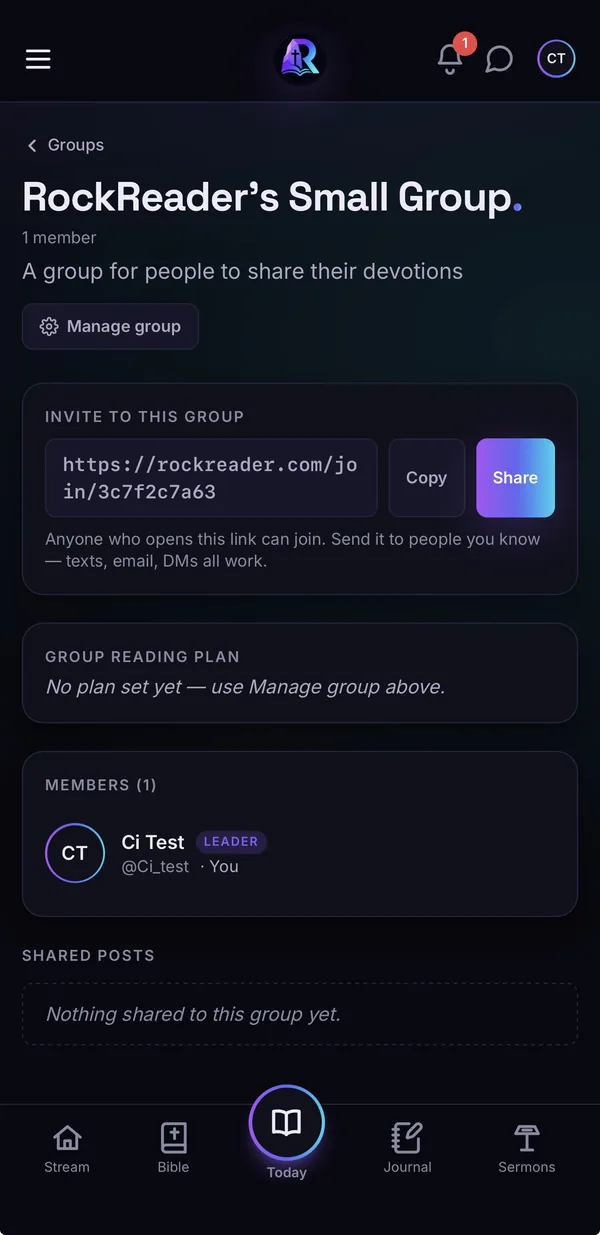
The new group, with its invite link. - 2Choose the group's reading plan. The leader picks one of the five structured plans, from Meet Jesus (30 days) to Bedrock (the full 365-day Old Testament, New Testament and Psalms cycle). Members who join can sync to it with one tap, so everyone is on the same day.
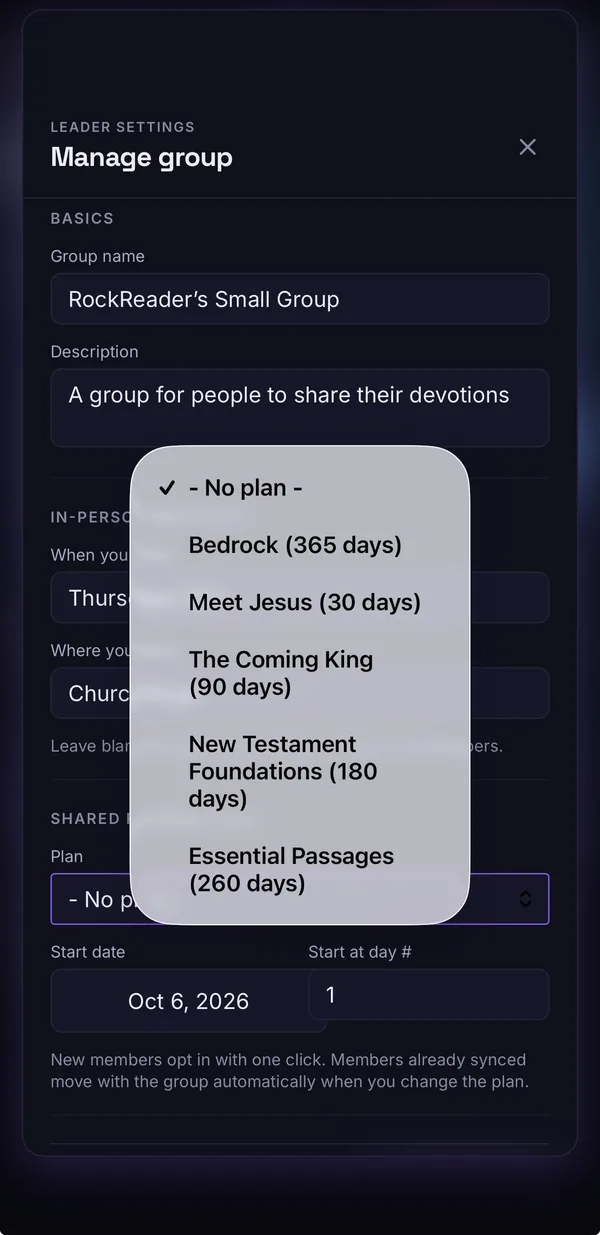
The leader picks one of the five plans. 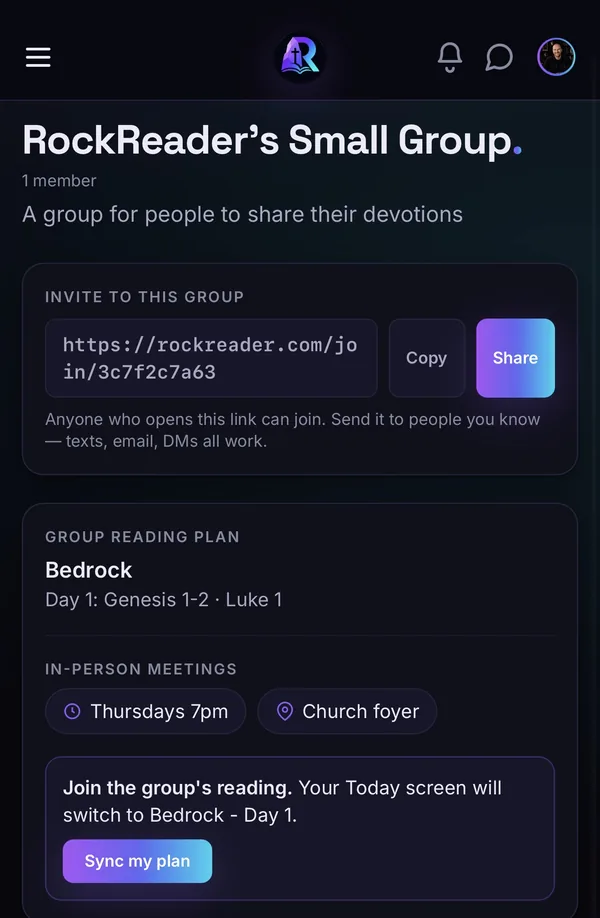
A member syncs to the group's plan with one tap. - 3Invite people. For someone already on RockReader, the leader taps Invite someone on RockReader and picks from the people they follow or who follow them, or searches by name. That person gets a notification and an email and chooses to join or decline. Nobody is added to a group without saying yes. For someone new, share the code or the join link: they create a free account, enter the code, and land on the same reading the leader is on.
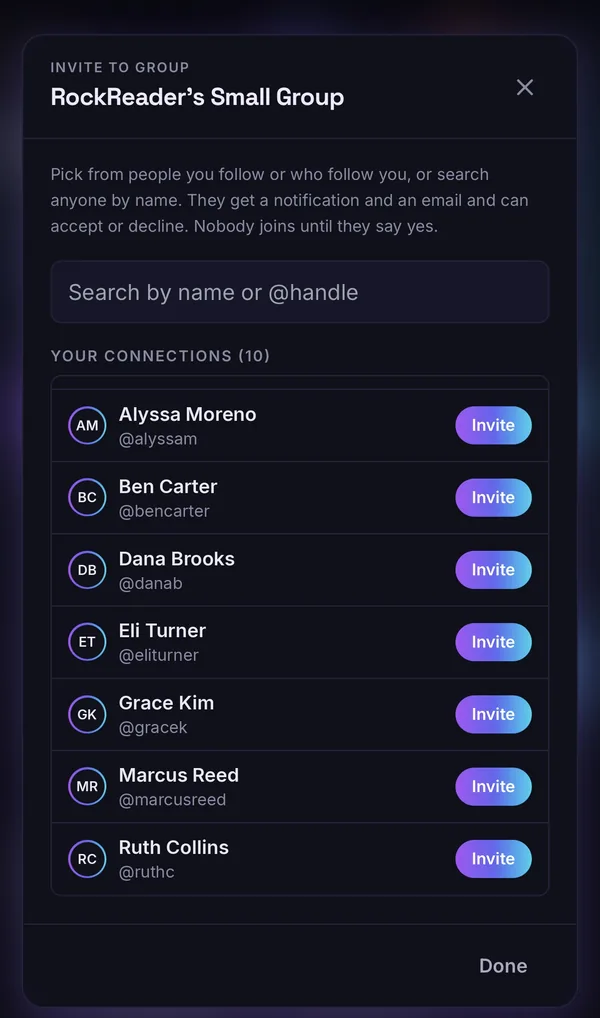
Invite from your connections or search by name. 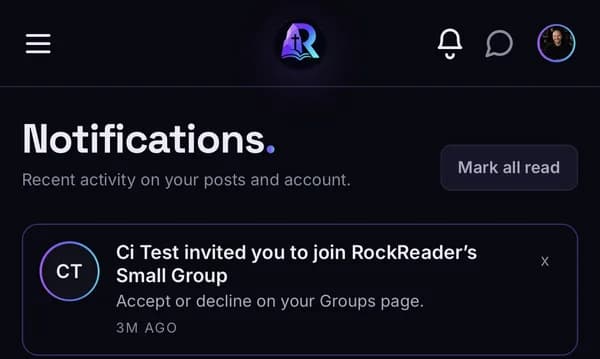
The invitation arrives as a notification and an email. 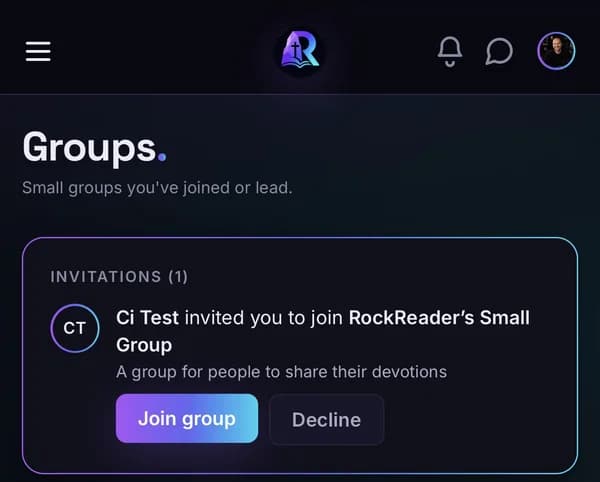
They join or decline. Nobody is added without saying yes. - 4Each person reads and writes alone. The day's passage opens with the study tools in the margin. A member taps a verse, writes a SOAP entry (Scripture, Observation, Application, Prayer), and saves it. At that moment the entry is private and encrypted. The group cannot see it. The leader cannot see it.
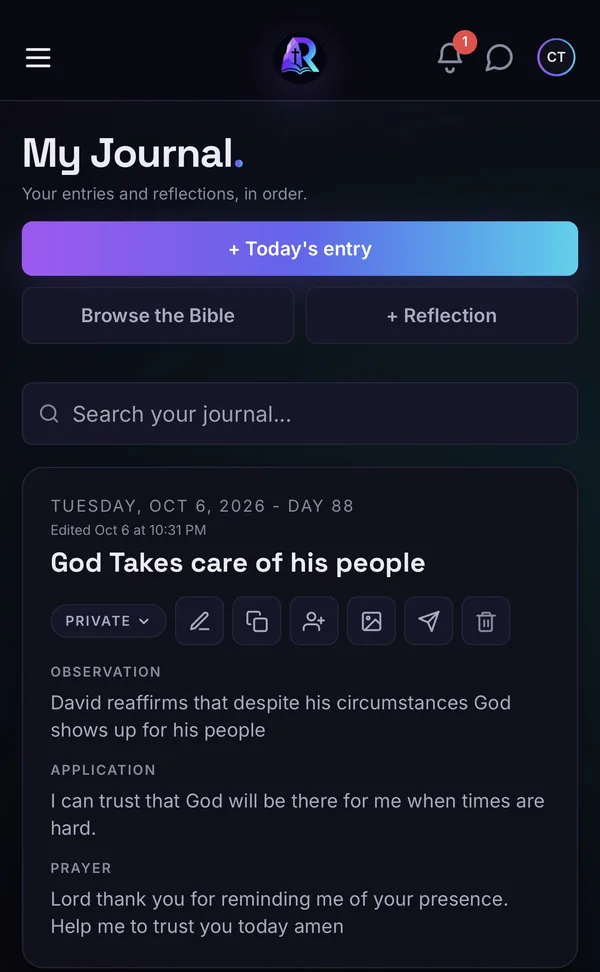
A saved entry is marked Private until you choose otherwise. - 5Share one entry, on purpose. Above the entry a label reads "Private, only you". To share, the writer ticks the group by name; the label changes to "Sharing with Tuesday Night" before anything is sent. Only that entry goes to the group. Every other entry stays private.
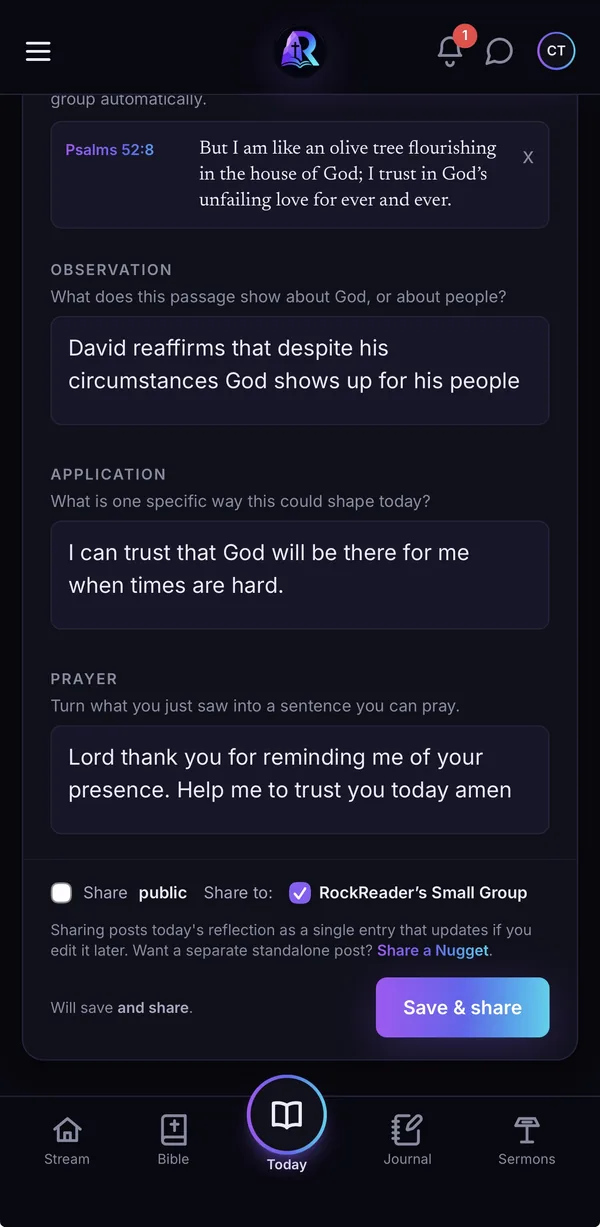
Public stays off. Only the ticked group gets this entry. - 6What another member sees. In their Stream, filtered to Tuesday Night, the shared reflection appears as one card with the writer's name, the passage, and the text they chose to share. They can react, comment, or reply privately. A prayer request shows a Prayer Pause that asks them to stop for thirty seconds before their prayer is counted. Nothing unshared is visible anywhere.
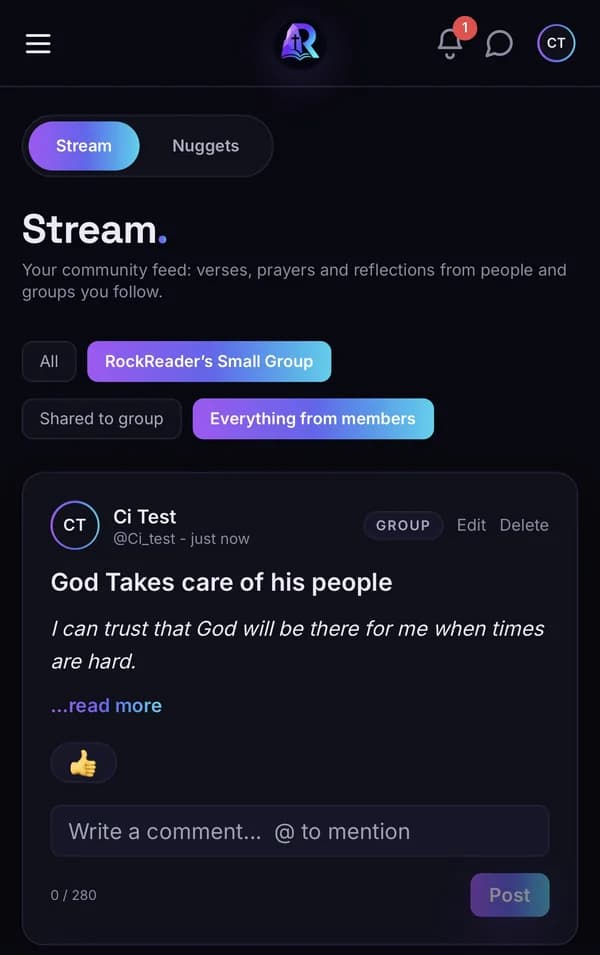
Stream filtered to the group shows only what was shared to it.
If your group would rather start on paper, there are group sheets ready to print: the small-group SOAP worksheet and the small-group reading plan are free PDFs, no account needed. The full set is here.
Private by default is the design, not a setting
Most apps that add community to Bible reading start from a feed and then add privacy controls on top. RockReader starts from the opposite end. A journal entry is private the moment you write it, encrypted at rest, and invisible to everyone including other members of your own group. Sharing is an explicit act on a specific entry.
There are no ads, no advertising SDKs, and no tracking of any kind, so nothing you read or write is being turned into an audience segment. You can export everything you have written at any time, or delete your account and take it all with you. The full detail is in the privacy policy.
One thing RockReader is deliberately not: anonymous. People use real names, because a small group only works when you know who you are reading with. Private journal, real names.
The study tools come with it
A group discussion is better when everyone arrives having actually understood the passage. Tap any verse in the reader and you get:
- Cross-references, so a verse is read next to the verses it is talking to
- Verse-by-verse public-domain commentary
- Hebrew and Greek word study, written for people without a seminary degree
- Translator footnotes, where the translation itself is making a judgment call
- Highlighting and verse notes that persist across translations
- Guided inductive study, for working through a passage step by step
None of it costs anything, and none of it requires leaving the passage to go look something up in another app.
RockReader vs. YouVersion for small groups
These are not the same kind of product, and for a lot of groups YouVersion is the right answer. Here is the honest split.
| What matters | YouVersion | RockReader |
|---|---|---|
| Plan library | Enormous, thousands of devotionals and studies | A focused set of reading plans, topical plans, and build-your-own |
| Translations | Hundreds of versions across many languages | Seven English translations: ESV, NIV, NKJV, NLT, NASB, KJV, WEB |
| Offline reading | Full offline downloads | No offline Bible. The iOS app keeps today's passage; the web app needs a connection |
| Study tools in the reader | Basic, aimed at reading | Cross-references, commentary, word study, footnotes, notes |
| Journaling | Notes and highlights | Structured SOAP journaling and free-form entries, encrypted |
| Who sees your writing | Notes can be public, private, or shared with friends | Private by default; sharing is per entry, to a group or person |
| Community shape | Friends, plus a large public layer | Small circles only. No public feed, no algorithm |
| Cost | Free | Free, with no ads and no tracking |
Who should choose something else
- You need full offline Bible reading. If your group reads on planes, on the subway, or where signal is unreliable, an app with complete offline downloads will serve you better.
- You need a language other than English. RockReader is English-only today.
- You want an enormous devotional catalogue. If the draw is browsing thousands of plans, we do not have that and are not trying to.
- You want academic original-language research. Word study here is built to help an ordinary reader understand a word, not to replace Logos or Accordance for morphological search and interlinears.
Frequently asked questions
What is the best Bible app for a small group?
It depends on what your group does together. If you mostly want a shared reading plan and a huge library of devotionals, YouVersion is hard to beat. If your group wants to study the passage, write real reflections on it, and share those reflections with each other rather than with the internet, that is what RockReader was built for.
Can my Bible journal stay private in a group?
Yes. Every journal entry is private by default and encrypted at rest. Sharing is a separate, deliberate action: you pick an entry and you pick who sees it. Nothing you write is visible to your group unless you choose to share that specific entry.
How does a small group read together in RockReader?
Everyone follows the same reading plan, so the group is in the same passage on the same day. Each person reads and journals on their own. What gets shared into the group is whatever each person decides to share, plus prayer requests and short reflections called Nuggets.
Is RockReader free for a whole group?
Yes. RockReader is free for every member. There are no in-app purchases, no subscriptions, no per-seat pricing, and no fee to create a group. There is also no advertising and no tracking.
Does RockReader have Bible study tools, or just reading?
Study tools are built into the reading screen. Tap a verse for cross-references, public-domain commentary, Hebrew and Greek word study, translator footnotes, highlighting, and verse notes. Seven English translations are included: ESV, NIV, NKJV, NLT, NASB, KJV, and WEB.
Is RockReader a social network?
Not in the usual sense. There are no follower counts to chase and no algorithm ranking what you see. Your Stream shows your groups, the people you follow, and posts other members chose to make public, and you can filter it to a single group. Every entry starts private, and you can turn public sharing off for your account entirely.
Read together. Grow with people you trust.
Ten minutes a day, with your group. Free, ad-free, private by default.
Create your group